The Awin Publisher MasterTag allows you to access and enable technology from Awin and our partners. For some of these technologies to work, their plugins need access to certain parts of your account. For transparency on what these plugins can do and what data they can access, we show their permissions on the Awin Platform.
This page lists the permission types and what they mean:
- By activating a plugin, you give permission for that individual plugin to access data based on their listed Permissions.
- By disabling a plugin, will revoke permission for that individual plugin to access that data, and the plugin will no longer function.
Permission List
API
(Allows access to your Awin reporting APIs)
A user will be joined to your account with the permissions level “Viewer”.
Each plugin can do different things depending on their permissions:
- Read: View your account reporting data available via our public APIs
- Write: Create, change, or delete data on your account via our public APIs
When disabling a plugin, that API user is automatically removed from your account.
Profile
(Allows access to your Awin profile)
The plugin will have access to certain information from the Contact Details on your Publisher account.
Each plugin can do different things depending on its permissions:
- Read: View your profile account details
- Write: The ability to create, change, or delete your profile account details
Website
Allows the plugin to run code on your website via the Awin Publisher MasterTag, so they can activate their technology on your website.
Each plugin can do different things depending on their permissions:
- Read: Read data on your selected website, via the Publisher MasterTag
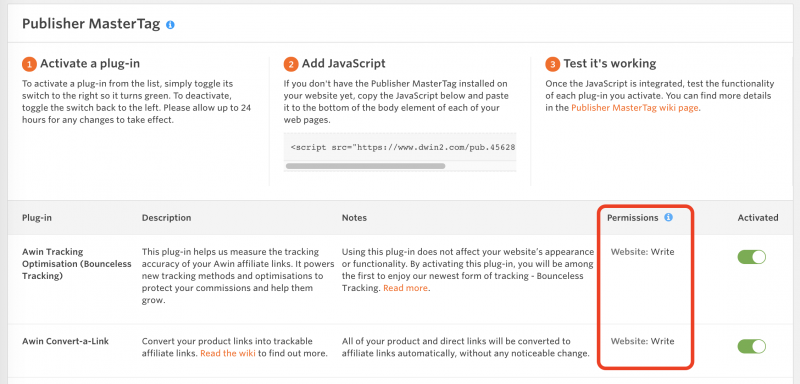
- Write: Run code on your selected website, via the Publisher MasterTag
Where to find them
You can see the permissions of each plugin in the Awin Platform: