Users have different levels of permission associated with the Publisher accounts to which they have access. These permissions are:
- Owner - Has full write-access to the account and can give and manage access to other users (Admin to Restricted Viewer).
- Admin - Has full write-access to the account and can give and manage access to other users, but cannot control the Owner status or edit bank details.
- Full Access - Has full access to the account and can view and edit settings, excluding the payment details.
- Viewer - Has read access to the account but cannot change settings.
- Restricted Viewer - Has read access to the account but cannot change settings, or view reporting, stats, or invoices.
 Important notes:
- Changing the Account Owner can only be done by Awin due to security reasons. To request this, contact us via the contact form, specifying your Publisher account ID and the email of the new account Owner. You may be required to provide us with certain documents to prove the ownership of the account.
- Only the Owner and the Admin can make changes to the Tax Details. However, the permission to edit Bank Details is limited to the Owner only. Any changes to your payment details will be reviewed and validated by Awin Network Quality Team.
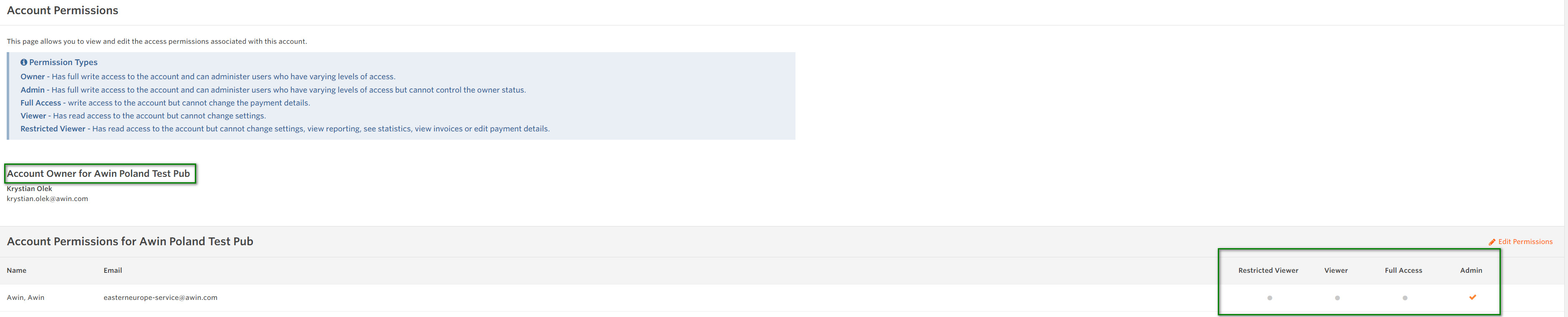
- Only the Owner and Admin can see the different user permissions on the Account Permissions page, as shown in the screenshot. Anyone below the Admin level will still have access to the page; however, they will only see the users but not the level of access.
- Protect your account: We recommend that all users, at least those with editing permissions (Owner, Admin and Full Access), activate Two-Step Verification. See the following article on how to do this How to activate and deactivate the Two-Step Verification.
To edit or manage access for users other than the Owner, see the article: How can I manage or edit user permissions?



